
World Backup Day: Beyond Storage
- Prabhleen Kaur
- Mar 31
- 5 min read

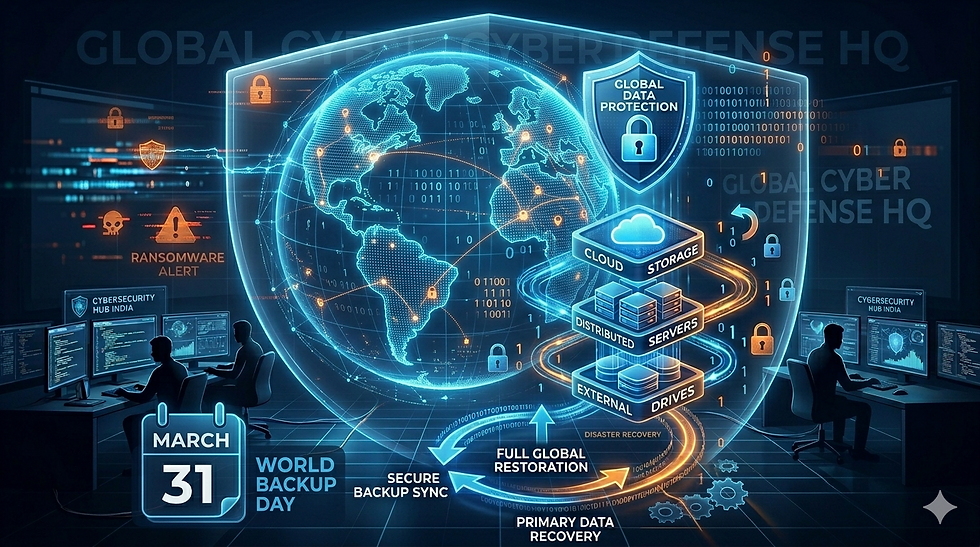
On 31st March, just a day before April fool’s day we celebrate World backup day, A Day that was born from a grassroots idea that took root on Reddit around 2011. A user posted about a friend whose hard drive had failed, lamenting that there was no backup. The thread manifested into a global campaign. Today, it has become a critical annual reminder, drawing attention from technology companies, cybersecurity experts, and everyday users around the world. Its core message is disarmingly simple - back up your data now, before the choice is made for you. The Date seems to be deliberate: the last thing you want is to wake up on April 1st realizing you have lost years of photos, Documents or business data, and no backup to save you. That, as they say, would be no laughing matter. According to the 2022 Backup Survey: 54% people Report Data Loss with Only 10% Backing Up Daily. No laughing matter.
What is a Backup?
A backup is a second copy of your important data, kept somewhere safe so that if the original is ever lost, damaged, or corrupted, you can recover it. For everyday users, this might mean copying family photos, personal documents, and emails onto an external hard drive or uploading them to cloud storage like Google Drive or iCloud. But backups go far beyond personal files. In the world of IT and business, the same principle applies at a much larger scale. Servers need to be backed up so that an entire machine can be restored if it fails. Databases require regular backups, these are maintained through SQL dumps, transaction logs, or snapshots to protect the structured data that applications depend on. Websites and their content, including themes, media, and CMS data, are backed up so that a hacked or crashed site can be rebuilt quickly. Application data, which includes user-generated content, preferences, and runtime state, must also be preserved separately from the application itself. Beyond data, system configurations and services need protection too. The settings, scripts, and environment variables that make a server or application run correctly can take hours to recreate from scratch, not just the files.
Why do Backups Matter?
What if your SSD decides to give up in middle of a meeting? A robust backup strategy is the only tool standing in between a minor inconvenience and a total environment rebuild. In the current era of digital warfare, backups matter more than ever as security incidents have also been on the rise , backups are being used as the only last resort to recover otherwise lost data. Operating a secure backup infrastructure is incredibly important. Small differences determine the length of downtime or even the complete data loss, as we do with many ransomware-have been able to observe attacks in the recent past. In short, a backup is your safety net for anything of value: whether that's a grandmother's photo album or a company's entire production infrastructure, the goal is always the same, ensure nothing critical is ever truly gone. In legacy IT operations, the effectiveness of a good backup infrastructure was one that had the least MTTR (Mean Time To Recovery) ,but systems that are up and running in seconds with an attacker’s backdoor are a bigger threat then having some downtime. To tackle this issue MTCR (Mean Time to Clean Recovery) was introduced. The concept is to measure the time it takes to restore an environment that is sanitized, secure and free from any of the attacker’s foothold.
While MTTR is just about restoring your backup , MTCR is about restoring your security. Without backups, your RTO (Recovery Time Objective) and RPO (Recovery Point Objective) are both effectively infinite, you can't recover, period. With them, you have a defined, testable path back
What can cost you data loss?
Data loss rarely announces itself. The most common culprit is hardware failure, spinning hard
drives have moving parts that wear out over time, and even solid-state drives have a finite
lifespan. Accidental deletion is another surprisingly frequent cause, whether it's the wrong file moved to the trash or a folder overwritten during a routine software update. Human error alone accounts for roughly a third of all data loss incidents.
External threats are a different story. With cybercriminals constantly evolving their attack
vectors. If we only consider the ransomware payments in the first half of the year 2024, victims paid a staggering 459.8 million USD to cyber criminals. The largest single ransom payment ever revealed was 75 million USD paid to the Dark Angels ransomware group by an undisclosed Fortune 50 company. Five to Ten years ago, a ransomware infection could lock you out of every file on your system within minutes, but the modern day attacker follow a sophisticated Quadruple extortion attack method in which they Encrypt data, Steal and threaten to leak data , Launch DDoS attacks against your site, and Directly harass your clients or stakeholders. The Vastaamo Data Breach is one of the biggest testimonies of how severe the effect of these attacks can be.
Common methodologies to keeping backups
About the various methods of backups , one of the most common strategy is the 3-2-1-1-0
backup strategy, where consumers should have three copies of data, stored on two different
types of media with one copy stored offsite, 1 immutable copy and 0 errors (verified through
automated testing). The tools you choose will vary, but the discipline behind using them
shouldn't.
Another strategy is the grandfather-Father-Son (GFS) backup strategy is a hierarchical, three-tier rotation scheme designed to manage data retention over time. It uses daily incremental backups ("Son") for recent data, weekly full backups ("Father") for short-term history, and monthly full backups ("Grandfather") for long-term archiving, ensuring reliable data recovery.
Then we have the 4-3-2 Strategy which is commonly used by large enterprises in which 4 copies of data are maintained in 3 distinct places, two of those locations must be physically and geographically distant from your primary site.
3-1-2 is the another most common strategy used for storing your data with cloud providers, this concept is to stores 3 copies of data, 1 media type (Usually Disk/cloud), and store with 2 different cloud providers.
Types Of Backup Options for your devices?
There are many strategies to maintain robust backups and not all backups are created equal, and the best approach depends on your needs, budget, and how much data you have. The good news is that the options have never been more varied or more accessible.
Cloud Backup Services
Most common among small to medium scale enterprises, Cloud backup involves storing copies of your data to remote servers managed by a third party. Services like Google Drive, and iCloud work silently in the background, continuously uploading changes as you work. The great advantage of cloud storage for the average user is geographic independence although corporate conglomerates can also use this advantage but following governmental regulations, any emergency and your files survive on a server elsewhere. Many services offer a few gigabytes of free space, with paid tiers for larger needs. The main considerations are internet speed, ongoing subscription costs, and privacy settings. For enterprise environments, most organizations go a step further and rely on Dedicated solutions for scalable device management and more controlled backup policies.
External Hard Drives and SSD
These are one of the most common backup options for everyday users and user’s paranoid about their data being misused if their cloud services provider gets compromised. The catch is that physical drives can fail, be stolen, for break along with your computer, which is why storing an external drive off-site, or combining it with cloud backup, is strongly recommended and while you’re waiting for your file transfer to reach 100%, take a moment to plan out your next big data dump. As matter of the fact is, one day a year isn’t nearly enough.
On March 31st , Experts suggest that you take your backup today and every day, so you don’t end.
up being an April fool on 1st April
References
Vastaamo Data Breach wiki :
Ransomware Amout Paid Article:
Author: Harbeer Singh


Comments